Server Hardware Dedicated/Cloud Business Device Specifications Requirements
Dedicated/Cloud Business Device Specifications Requirements
Server Needs
Considerations:
- Number of users
- Size of Databases
- Growth Rate
- Operating System Requirements
- Budget
Operating System
Windows 2016 Enterprise Edition
Processor
A quad and up-to a 8 core processor, i believe a quad core will be plenty for this business they are expected to grown within the next 5 years but not to an overwhelming size.
larger companies typically have 8-16 core processors
Storage
As majority of applications will be stored on the staff machines themselves the storage needs for the servers are surprisingly low.
How ever it is still recommended that the storage device that you invest in has a high disk speed. a separate storage device is recommended which will run SQL log, temp files and data.
- 1 x Storage device with 500GBs dedicated to SQL log, temp files and data.
- 1 x Storage device with 1 terabyte dedicated to the server overall excluding log, temp files and data.
- 1 x Storage device 100Gbs for the Tempdb Database
When using a dedicated server its important to keep in mind when upgrading storage devices that the time to transfer data to larger storage devices is very time consuming.
This may put the business into a stand still while the process completes; this may take up-to 1-2 days depending on the data,
Memory
16-64Gbs of RAM. In This case 24 should be plenty for this small business its also simply enough to upgrade if the business required more ram.
1Gb of Ram dedicated to the operating system by default 12-16Gbs of Ram will be dedicated to the SQL server depending on the size of the SQL server 8-12 is recommended in the business current state
Laptop Needs:
We highly suggest that the company there '4' travel invest in a newer generation of devices but still within their budget. Having these robust devices will assure that the staff can execute their tasks quickly and with precision; This allows the company to save money in the long term.
Operating System
Windows Small Business Server 2011 Standard $1,315.00 NZD
A quad-core processor is highly recommended as the staff will need to ability to multi-task with their device. Preferably an i7 8th generation quad core processor.
Storage
At least a 500Gbs SSD. This allows for faster boot time and application start up.
Memory
8Gbs off DDR3/DDR4 Ram this also helps with mulit-tasking.
Peripherals
Camera: It may be important to include a camera in case the staff want to chat with clients or other staff face to face who are at the other company branch. This could be used for staff meetings with all the staff including those in the other company branch.
Mouse and keyboard with good ergonomics as the staff may be at their computers for 8+ hours a day
Ethernet/Wi-fi Card
Fast wireless connectivity and potentially an Ethernet port (Optional). Ethernet is optional as the staff will be connecting wirelessly to the router which connected to the server via an Ethernet cable
Battery
The laptops need to have 8hrs+ Battery life as two of the staff member's are mobile.
Server Hardware & Devices Conclusion
Company There '4' Travel
SERVER HARDWARE DEDICATED AND CLOUD SPECIFICATIONS
|
|
There
"4" Travel Nelson Server
|
|
Operating System
|
Windows Small
Business Server 2011 Standard
|
Processor
|
Intel® Xeon
Processor E3-1230 3.20 Ghz (Min) 3.60 Ghz (Max) 8
MB Intel Smart Cache
|
Memory
|
24 GB DDR3 (1333
Mhz)
|
Physical Storage
|
1 x
100 GB HDD
1 x
500 GB SSD
1 x
1 Terabyte SSD
|
Network Controller
|
Intel®
82599EN Single-Port 10G SPF+ Pcie 2.0 x8, Ethernet Network Interface Card
|
There
"4" Travel Christchurch Server
|
|
Operating System
|
Windows Small Business Server 2011 Standard
|
Processor
|
Intel® Xeon
Processor E3-1230 3.20 Ghz (Min) 3.60 Ghz (Max) 8
MB Intel Smart Cache
|
Memory
|
24
GB DDR3 (1333 Mhz)
|
Physical Storage
|
1 x
100 GB HDD
1 x
500 GB SSD
1 x
1 Terabyte SSD
|
Network Controller
|
Intel®
82599EN Single-Port 10G SPF+ Pcie 2.0 x8, Ethernet Network Interface Card
|
Staff
Laptops
|
|
Model
|
ASUS Zenbook 14
UX431FA
|
Operating System
|
Windows 10 Pro
|
Processor
|
Intel®
Core™ i7-8565U processor
1.8GHz
quad-core with Turbo Boost (up to 3.4GHz) and 6MB cache
|
Memory
|
8.00
GB of 2133MHz LPDDR3 onboard memory
|
Physical Storage
|
560Gb
PCIe SSD
|
Wi-fi Card
|
Dual-band
802.11ac gigabit-class Wi-Fi
|
Camera
|
HD camera
|
Graphics
|
Integrated
Intel UHD Graphics 620
|
Display
|
14"
LED-backlit Full HD (1920 x 1080) 16:9 slim-bezel NanoEdge display1
|
ASUS Zenbook 14 UX431FA
Price $1569 x 13 Staff =
20,397 - 20% ASUS bulk buy for small business start up
Final Business cost:
$16,317.6
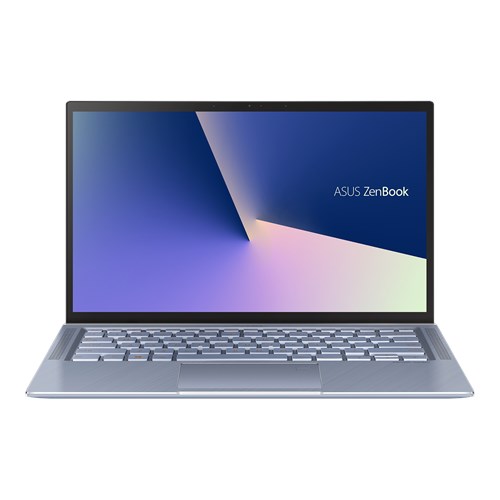
Pro's:
Excellent at multi-tasking.
Room to upgrade the storage space and ram.
Built in Graphics.
Web Camera.
Long Battery Life 10.5 Hours expected
Cons:
No Ethernet port however this is optional with most business requirements. However being plugged in via Ethernet would increase connectivity and internet speeds.
This model does not come with a touch screen.
To find out more on this product head to the link below
Recommendation by Matthew Fraser
Company: MatWarDal Enterprises "There for you"
References
©ASUSTeK Computer Inc. All rights reserved. https://www.asus.com/nz/Laptops/ASUS-ZenBook-14-UX431FA/
I am impressed - your blog gives me a very good idea of what you are doing. I am very much looking forward to see further work.
ReplyDeletePS: Thank you for the last meeting.